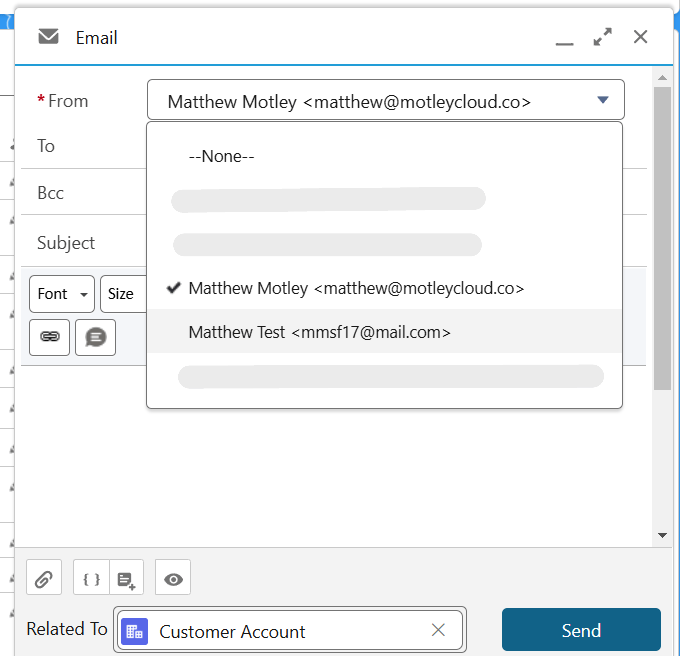
Salesforce has the ability to send-as someone else via predefined email addresses. A potential use case is when an Invoice is ready to send however the sales rep is generally not involved with invoicing, but they still manage the relationship.
The Good
- Sending on behalf of someone IS possible through “Organization-wide Addresses”. This article’s example shows a test email account mmsf17@mail.com as an option when sending an email.
- The initial email below was sent from Salesforce from Matthew Motley matthew@motleycloud.co, there is no user with mmsf17@mail.com
- Visibility to the Org-wide Addresses can be limited if needed to the users that will be sending on behalf of others. The “Permission Sets” (elevated/special permissions) below could be distributed to individuals allowed to send-as someone else, this is the recommended, highest security approach.


The Challenges
- In testing, the email from Matthew Test <mmsf17@mail.com> to Matthew Motley <matthew@motleycloud.co> ended up in the matthew@motleycloud.co Spam folder in Gmail. Matthew Test was not even setup as a user in the test org. Be aware, the email might end up in Spam, in this example that’s what happened with Gmail.
- Replies to these emails would not return to Salesforce, custom code would be needed that interacts with the business email handler to make this possible.
- Anyone wanting to be sent on behalf of would need to verify within 72 hours of being setup. It’s not a difficult task, but it is another step. Below is what email addresses see when setup as an Organization-Wide Address.

Additional Considerations and Details (from Salesforce)
 Motley Cloud Consulting