I learned about this the hard way, functionality had been deployed, it was a break-fix.
The Issue:
Users could no longer be created
The Error:
An Error Occurred with Your “User Create & Edit” Flow
You’ve received this email because an error occurred while your “User Create & Edit” flow was running. Debug this flow in Flow Builder.
Error element Assign (FlowRecordCreate).
This error occurred when the flow tried to create records: MIXED_DML_OPERATION: DML operation on setup object is not permitted after you have updated a non-setup object (or vice versa): CollaborationGroupMember, original object: User. You can look up ExceptionCode values in the SOAP API Developer Guide.
What I discovered:
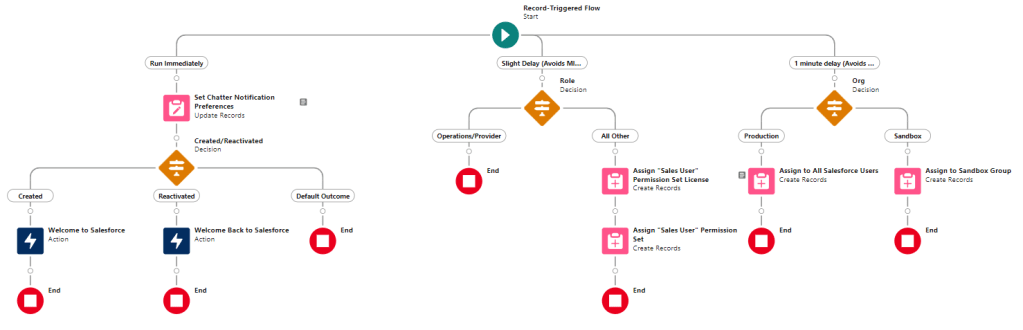
DML operation on setup object is not permitted after you have updated a non-setup object (or vice versa). Which translated in my use case was I couldn’t add a Permission Set in the same branch of the flow as the User fields update.
How I fixed it:
Assisted by this Automation Champion article I put in two scheduled paths, one to add permissions, and the other to add the User to the “All Salesforce Users” Chatter group. I had to add two because adding permissions and a new group user when done at the same time encountered another MIXED DML error.
 Motley Cloud Consulting
Leave a comment