Contact Roles on the Opportunity serve multiple purposes and are advantageous to utilize. Not only do they guide the business insight into who is involved with the Opportunity, but it also enables a more complete picture of Campaign Influence. Sales AND Marketing benefit, it’s a win-win!
The problem: Contact Roles can’t be required on an Opportunity.
The solution: A custom field, validation rule to enforce and a flow to populate
- Custom Field: Primary Contact (Primary_Contact__c) on the Opportunity object. The field should not be on the page layout, the idea is to encourage usage of the “Contact Roles” object
- Validation Rule: Probability_greater_than_XX (fill in “XX” with lowest probability in sales process)
- ischanged(Probability)
&&
Probability > 0.15
&&
isblank( Primary_Contact__c ) - Error Message: A “Primary” Contact Role is required to save
- ischanged(Probability)
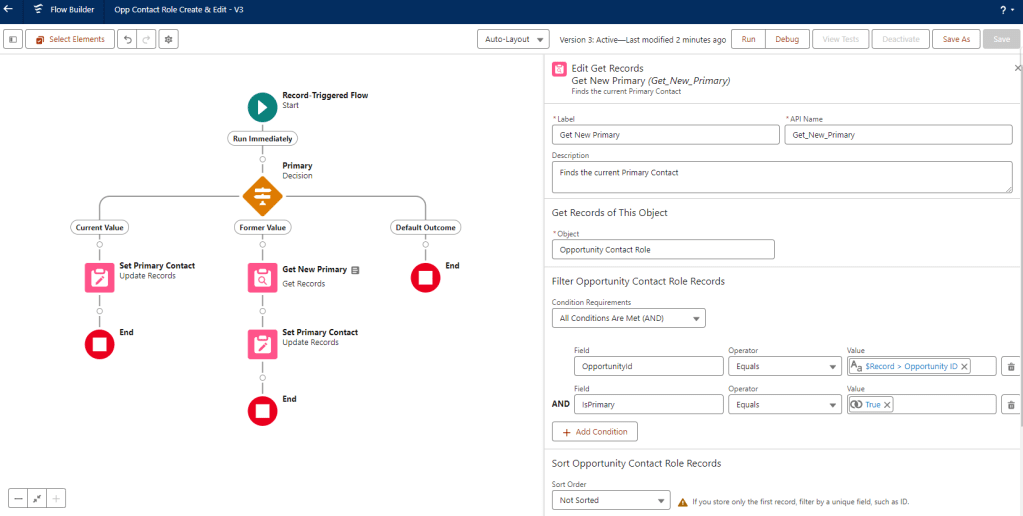
- Flow: Contact Role Create & Edit
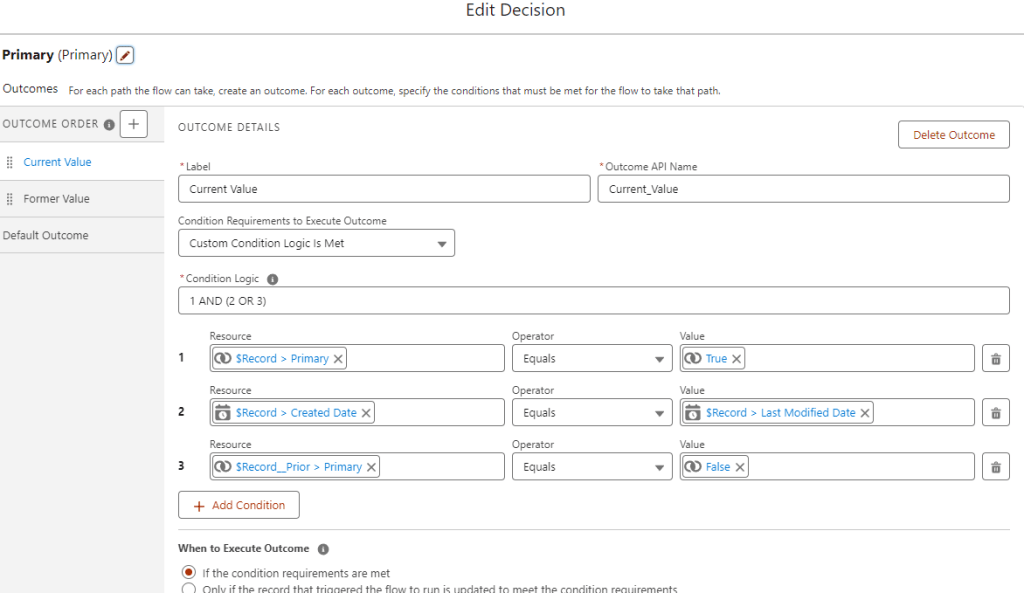
- Decision – Determine whether the current record is now or was formerly the primary
- Current Value
- Set current Contact Role’s Contact Id as the Primary Contact on the Opportunity
- Former Value
- Look for the current Primary Contact and set that value as the Primary Contact on the Opportunity
- Default Outcome
- Do Nothing
- Current Value
- Decision – Determine whether the current record is now or was formerly the primary
 Motley Cloud Consulting
Leave a comment